


Dreamweaving Garden
4.3144.00 Reviews
App Specs
- Version
- 1.3.51
- Updated On
- License
- Free
- Downloads
- 50,000+
- Developer
- Pogo Hopper Games
- Categories
- Simulation
- Platform
- Android
Screenshots

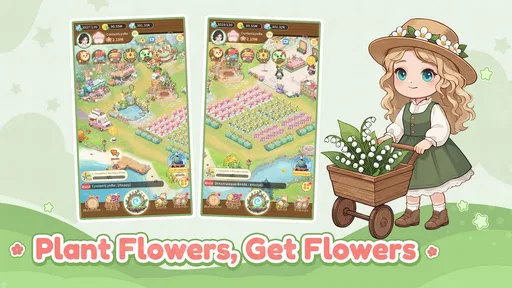
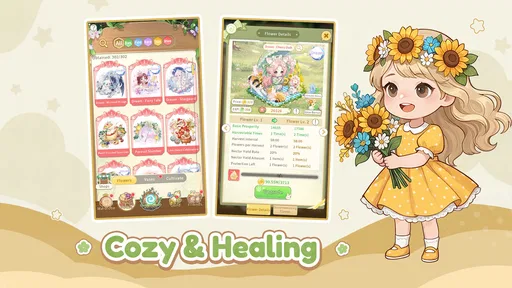
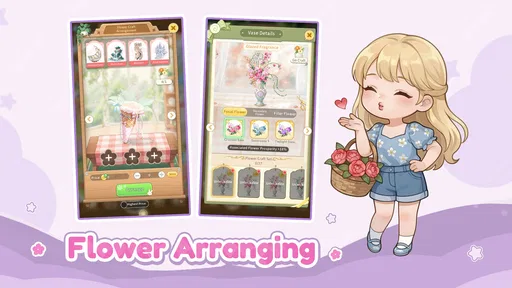

 Analysis by AppCompare
Ever fancy having your own magical garden right in your pocket? Well, that's what Dreamweaving Garden promises. It's this delightful little app that's been buzzing around, drawing in anyone with a love for nature and a flair for creativity. Let me walk you through my experience with it, and trust me, you might just find yourself enchanted.
Who will enjoy tending this garden?
I’d point this game toward someone who likes gentle progress more than constant action. The appeal is in making a garden feel personal, watching plants change, and deciding what to do with what you grow. If you enjoy decorating, collecting, and dipping into a game in short visits, that combination is a better fit than a simulation built around pressure or competition.
It is also a reasonable pick for players who want a soft, imaginative setting without needing real gardening knowledge. You can approach it as a creative pastime rather than a lesson in botany. On the other hand, if you want precise real-world growing advice, demanding tactical challenges, or a story that drives every session forward, I’d choose a different kind of game. The gardening theme is the draw here; it shouldn’t be mistaken for a practical gardening tool.
In the simulation category, many familiar alternatives focus on managing farms, production chains, or busy to-do lists. This one’s stated identity is more intimate: flowers and a garden of your own. That makes it appealing when you want to shape a small space rather than run a sprawling operation. The trade-off is that players who love optimization, deep resource accounting, or rapid goals may find the softer pace less satisfying.
A small routine that suits real life
I can imagine opening it during a quiet ten-minute break, choosing a planting task, then leaving the garden alone while I get on with the day. When I return, checking what has changed gives the visit a natural beginning and end. That rhythm can make the game easier to fit around work or study than a title that expects a long, uninterrupted session. It also means it is worth thinking about whether waiting feels relaxing to you or simply like an obstacle.
A useful habit is to decide what you want from a visit before tapping around: tend to plants, work toward a craft, or spend time shaping the look of the garden. A simple intention helps a leisurely game feel satisfying without turning it into a checklist. I’d avoid spending just to hurry through a wait unless the time saved genuinely matters to you; the slower pace is part of the experience, and purchases can make that patience-versus-speed choice more noticeable.
Readability, navigation, and sensory comfort
The original experience gave me an impression of an approachable setup, with character creation followed by direct interaction with the garden. That kind of clear, visual loop can be easier to understand than a simulation that starts with several layers of menus and management screens. Still, I would not assume that every control or label will suit every player. If small interface elements are difficult for you to read or select, try the opening interactions at your own pace before committing to longer sessions.
Worth Reading Before You Choose

Flipboard Shows What News Apps Must Do Beyond the Feed

Switching to Android Auto Means Rethinking Your Driving Routine

Google Calendar Makes a Crowded Week Easier to Manage

Ludo King Makes the Most of the Minutes Between Plans

Baby Panda World Brings Quick Play to Modern Phones, but Its Game Library Feels Busy

ESPN’s Live Game View Makes Following Close Games Easier
The garden’s bright colors, plant animations, music, and sound effects help create its cozy mood, but they are also worth considering from a sensory point of view. A player who finds busy motion or continuous audio tiring may prefer shorter visits or to play in a calmer setting. I wouldn’t treat a soothing presentation as universally soothing: personal sensitivity varies, and the best test is how the game feels to you after a few minutes rather than how its theme sounds on paper.
For motor comfort, the described planting interaction is a drag-and-drop action. That is straightforward for many people, but it can be less comfortable for anyone who finds sustained dragging or precise touch gestures difficult. I’d test that interaction early, while the garden is still simple, and notice whether you can place items without repeated corrections. A game can be visually gentle yet still ask for a type of touch input that does not work well for every hand.
Access in different situations
This is best approached as a game for moments when you can look at the screen and interact with it, rather than something to rely on while walking, commuting through a crowded space, or dividing attention between tasks. A short visit at home, during a break, or while winding down gives you more freedom to see the garden and make deliberate choices. If you need a game that works comfortably with one hand, in bright outdoor light, or with sound off, check those conditions yourself before making it part of a daily routine.
There is a social dimension involving visits to other gardens, sharing, and trading, which may appeal if you enjoy exchanging ideas with other players. It may be less attractive if you prefer a fully solitary experience or do not want social activity to shape your play. I’d treat the community side as an optional reason to return, not as a requirement for enjoying the central pleasure of tending your own space.
Getting Started with Your Dream Garden
From the moment I downloaded Dreamweaving Garden, I felt a sense of wonder. The app has a super intuitive setup. First things first, you create your character—this little avatar that becomes your gardening persona. I had a blast customizing mine; there’s a plethora of options from hairstyles to quirky outfits. It feels like your garden journey is truly yours right from the start.
The Magic of Planting
Now, onto the core of the game: planting. The app offers a wide variety of seeds, each with its own magical properties. Planting them is as simple as dragging and dropping them into the soil. I loved watching the seeds sprout, grow, and eventually bloom into vibrant flowers. The graphics here are stunning, with each plant rendered in beautiful detail. Plus, there's a real-time growth feature. So if you're patient, you can see your plants grow in real-time, or you can speed things up with special in-app items.
Crafting and Creating
Beyond just planting, Dreamweaving Garden allows you to craft items using your plants. There’s something magical about harvesting ingredients and creating potions or little garden ornaments. It's not just about aesthetics; these crafts can help enhance your garden’s growth or attract rare creatures. There's a strategy element here that keeps things interesting and engaging.
Social Elements and Community
One of the highlights for me was the social aspect. You can visit friends’ gardens, share your creations, and even trade items. There’s a lovely community vibe, and I've made a few virtual gardening buddies who share tips and tricks. The app also hosts regular events and challenges, which are a great way to earn unique seeds and items. It keeps the game fresh and offers a reason to check back regularly.
Visual and Audio Experience
The visuals are nothing short of breathtaking. The colors are vibrant and the animations smooth, making the whole gardening experience feel almost tangible. The soothing background music and sound effects add another layer of immersion. Seriously, it’s like a little escape from reality every time you open the app.
Room for Growth?
While I’m head over heels for Dreamweaving Garden, there are areas where it could grow a bit. Occasionally, the app can be a touch slow on older devices, especially when your garden is bustling with life. Also, while the in-app purchases aren’t necessary to enjoy the game, they are there, and it’s tempting to splurge to get those rare seeds quicker. But hey, patience is a gardener’s virtue, right?
What to expect before installing
Pogo Hopper Games makes this free simulation game, and it has an average rating of 4.5 from around 470 ratings, with more than 50,000 installs. Its Teen age rating is worth noting for families choosing games together. The current version is 1.3.25, and it requires Android 5.0 or later. I’d also keep its purchase model in mind: optional in-app items range from $0.49 to $99.99 each, so it is sensible to set a spending boundary before handing a device to a younger player.
Those details answer a few practical questions, but the more important one is whether the pace suits you. The game is free to start, yet a player who regularly pays to skip waits could spend more than expected. I’d begin without buying anything and see whether natural growth feels rewarding. If it does, the purchase prompts are easier to treat as a choice rather than a necessity; if waiting irritates you, that friction may keep returning.
Another question is whether it can become a daily habit without taking over the day. Its real-time growth and social activities give you reasons to revisit, but I’d keep those visits on your terms. A brief check-in can be pleasant; feeling obliged to catch every event or keep up with friends can turn a relaxing garden into another chore. I would use the events as occasional variety, not as a schedule I have to obey.
For a more thoughtful start, I’d make a small personal test: create the character, try planting, then notice whether the touch gestures, colors, and sound feel comfortable. Next, leave the game and return later to see whether waiting adds anticipation or annoyance. This quick trial tells you more about fit than simply liking the garden theme. If the controls or sensory presentation do not suit you, there is little value in forcing yourself through a longer session.
There are also trade-offs in the crafting loop. Turning harvests into useful items gives plants a purpose beyond decoration, which is a welcome reason to plan what to grow. But players who want to freely design every detail may care less about crafting goals, while completion-minded players may feel nudged toward collecting ingredients and checking progress. I’d choose a personal balance: treat crafting as a way to add direction, not as a requirement to optimize every flower.
For anyone comparing it with a conventional farm simulator, the key question is what kind of ownership feels rewarding. A farm game often emphasizes output and expansion; this garden’s appeal, as I experienced it, is closer to tending a small collection of flowers, making things from what grows, and sharing discoveries. If that quieter scale sounds satisfying, it has a clear niche. If you want elaborate production planning or high-pressure competition, another simulation will likely give you more to manage.
Where the welcome has limits
I would not call the game accessible for every situation just because its presentation feels gentle. Touch interaction, visual detail, real-time waiting, and social play can each be a barrier depending on a person’s needs, device, and surroundings. A player who relies on very large text, alternative input, or a screen-free option should check the experience directly before deciding it will work for them. Likewise, someone who wants a strictly offline, self-contained pastime may prefer a game designed around that expectation.
My practical recommendation is to judge it by the parts you will repeat most: placing seeds, checking growth, and deciding whether to craft or visit other gardens. If those actions feel comfortable, the game offers a warm, unhurried space to return to. If they feel fiddly or the wait-and-return loop does not fit your routine, the attractive theme alone may not compensate. That is a fair reason to move on rather than trying to make every cozy game work for you.
All in all, Dreamweaving Garden is a delightful escape into a world of magic and creativity. Whether you’re a gardening enthusiast or just someone looking for a peaceful app to unwind with, this app offers something special. It’s not just about growing plants; it’s about nurturing a world of your own creation. So, are you ready to start your own dream garden?
My inclusive verdict is positive, with a clear qualification: this suits players who enjoy calm visual interaction and can comfortably use its touch-based planting, while people who need specific reading, motor, sensory, or offline accommodations should test those needs first. I like that the garden can be approached in short, self-directed visits, but I would not recommend it to someone who dislikes waiting, dislikes optional spending prompts, or wants a highly structured challenge. If a small, personal flower garden sounds more appealing than running a busy farm, it is worth trying at your own pace and deciding from there.
Pros
- Beautiful and immersive graphics.
- Easy-to-learn gameplay mechanics.
- Engaging storyline with quests.
- Regular updates with new content.
- Offline mode available for play.
Cons
- In-app purchases can be pricey.
- Requires a stable internet connection.
- Some levels feel repetitive.
- Ads can interrupt gameplay.
- Battery consumption is quite high.
FAQs for Dreamweaving Garden
What is Dreamweaving Garden and what can I expect from the gameplay?
Dreamweaving Garden is a captivating mobile game where players can cultivate magical gardens full of enchanting plants and creatures. Expect a mix of strategy and creativity as you design your garden layouts, nurture unique flora, and complete various quests. The game combines elements of resource management with beautiful graphics, providing an immersive experience.
Is Dreamweaving Garden free to play, or does it include in-app purchases?
Dreamweaving Garden is free to download and play, but it includes optional in-app purchases. These purchases can enhance gameplay by providing items like rare seeds or special decorations. While these purchases can accelerate progress, they are not necessary to enjoy the full game experience, allowing players to advance at their own pace.
Can Dreamweaving Garden be played offline, or does it require an internet connection?
Dreamweaving Garden requires an internet connection to ensure that all features, updates, and social interactions are accessible. While some basic gameplay elements may be available offline, to fully enjoy events, competitions, and community features, a stable internet connection is recommended.
What devices are compatible with Dreamweaving Garden?
Dreamweaving Garden is available for both Android and iOS devices. It’s optimized for a range of smartphones and tablets, ensuring smooth performance across various screen sizes and resolutions. To ensure the best experience, check that your device meets the app’s minimum system requirements before downloading.
Are there any social features in Dreamweaving Garden, and how do they enhance the game?
Yes, Dreamweaving Garden includes several social features that enhance the gaming experience. Players can visit friends’ gardens, share tips, and compete in friendly challenges. These interactions foster a community atmosphere, allowing players to connect, collaborate, and compete, adding an extra layer of enjoyment to the game.


